
If you already own a handful of Z-Wave front door locks, sensors, or switches, you know the frustration of them not talking to each other without the right controller. A z-wave smart home hub is the box that solves that problem, translating Z-Wave’s low-power wireless signal into commands your phone, voice assistant, or automation routine can actually use. Without one, your devices sit isolated instead of working as a system.
The short answer to what you need: a hub with a strong Z-Wave Plus or 700/800-series chip, reliable local processing so it still works if the internet drops, and enough range to cover your whole house. Some hubs also bridge Zigbee or Wi-Fi devices, which matters if your setup is mixed rather than pure Z-Wave. Picking a z-wave compatible smart home hub that matches your existing gear saves you from re-buying sensors later.
We tested and compared options across price, reliability, and app quality to build this list of eight hubs worth your money. Whether you’re starting fresh or replacing an aging controller, you’ll find a pick suited to your budget, your technical comfort level, and how many devices you’re actually running.
1. What does a Z-Wave hub actually do?
At its core, a Z-Wave hub is a radio translator. Z-Wave devices communicate over a low-power mesh network using a frequency (908.42 MHz in the US) that your phone or router can’t read directly. The hub listens on that frequency, decodes the signal, and turns it into something your app, voice assistant, or automation platform understands. Without that translation layer, a Z-Wave lock or motion sensor is just an isolated gadget with no way to report status or receive commands from outside its own radio range.
Think of the hub as the traffic controller for every device on your network. It keeps a map of which switches, sensors, and locks exist, routes messages between them, and repeats signals through the mesh so a sensor in your basement can still reach a hub upstairs by hopping through nearby devices. This mesh behavior is one reason Z-Wave scales well in larger homes: every mains-powered device (not battery-powered ones) acts as a repeater, extending coverage without extra hardware.
A Z-Wave hub doesn’t just connect your devices, it decides whether your smart home still works when your internet doesn’t.
Because many hubs process automations locally rather than relying on a cloud server, your lights still turn on with your locks, and your thermostat still follows its schedule, even when the internet goes down. That local processing is the biggest practical difference between a basic z wave smart home hub and a cheap Wi-Fi bridge that stops responding the moment your connection drops.
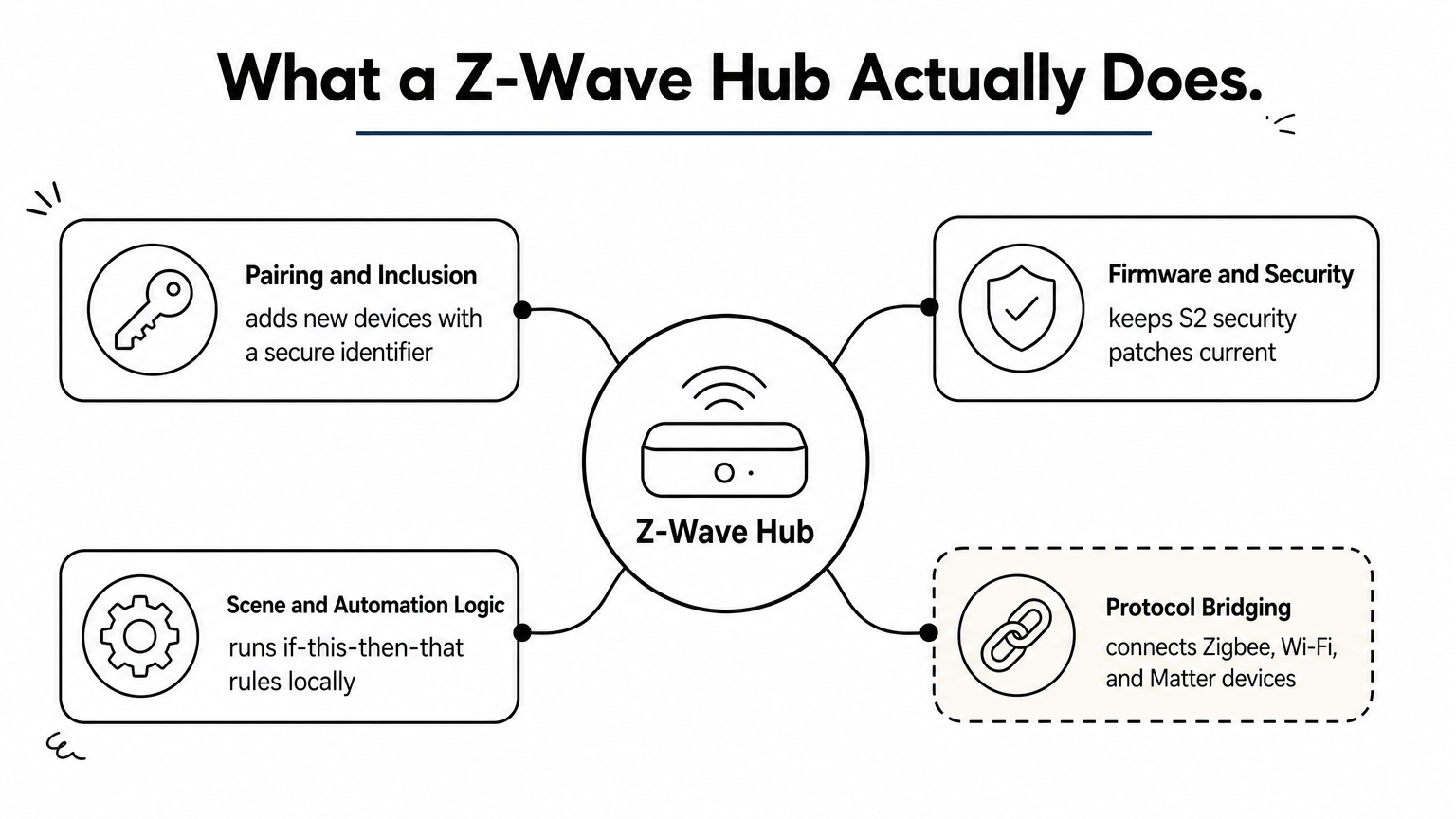
Most hubs also handle a few jobs that go beyond simple translation:
- Pairing and inclusion: adding new Z-Wave devices to the network and assigning them a secure identifier
- Firmware and security updates: keeping the Z-Wave chip current with S2 security patches
- Scene and automation logic: running “if this, then that” rules without a phone app open
- Bridging protocols: some hubs also speak Zigbee, Wi-Fi, or Matter, letting one controller manage a mixed ecosystem
That last point matters if you’re not running a pure Z-Wave setup. A genuinely z-wave compatible smart home hub that also bridges other protocols saves you from running three separate apps just to turn off your lights.
2. Aeotec Smart Home Hub
Aeotec built its reputation on Z-Wave sensors and plugs, and its Smart Home Hub (the successor to the older Smart Start) reflects that pedigree. It runs on a 700-series Z-Wave chip, ships with the SmartThings-based software, and gives you a controller that’s equally comfortable for a first-time buyer or someone migrating from an older Aeotec box.
Key features
Aeotec’s hub packs a 700-series radio with extended range, a rechargeable battery backup that keeps automations running through short outages, and a rules engine that handles both simple triggers and multi-step scenes. The local automation layer means your lights and locks keep responding even if your Wi-Fi drops.
The Aeotec hub proves you don’t need a subscription to get dependable, local Z-Wave control.
Compatibility and integrations
Beyond Z-Wave, the hub bridges Wi-Fi devices and Zigbee gear, which works a little differently, and it works with Amazon Alexa and Google Assistant out of the box. Support for Matter devices is rolling out through firmware updates, which matters if you’re planning to add newer gadgets down the line.
Who it’s for
Homeowners already invested in Aeotec sensors, or anyone wanting a beginner-friendly setup with a proven mobile app, will feel at home here. It’s less suited to power users who want deep custom scripting.
Price and value
Expect to pay in the $100 to $130 range on Amazon, depending on bundle. For that price, you get a stable, actively updated hub with solid mesh performance, making it one of the better value picks on this list for everyday households.
3. Homey Pro by Athom
Homey Pro stands apart from the other hubs on this list because it doesn’t just support Z-Wave, it tries to be the last controller you’ll ever need. Athom, the Dutch company behind it, built a single sphere-shaped device that speaks Z-Wave, Zigbee, Wi-Fi, Bluetooth, and infrared, then wraps all of it in a flow-based automation engine that reads almost like plain English logic.
Key features
Only Homey packs seven wireless radios into one unit, including a 700-series Z-Wave chip with full mesh support. Its flow builder lets you chain triggers and conditions visually, without touching code, and the companion app store adds community-built integrations for niche devices most hubs ignore.
A z-wave compatible smart home hub is only as useful as the automations you can actually build on it, and Homey’s flow engine makes that part almost effortless.
Compatibility and integrations
Beyond Z-Wave and Zigbee, Homey talks to Philips Hue, Sonos, Apple HomeKit, Google Assistant, and Amazon Alexa. Its app library covers thousands of third-party devices, which makes it one of the most flexible z-wave hub options for mixed households running gear from several brands.
Who it’s for
Tinkerers and households with a genuinely mixed ecosystem, locks on Z-Wave, bulbs on Zigbee, speakers on Wi-Fi, get the most value here. Casual users who just want lights on a schedule may find the flow builder more depth than they need.
Price and value
Homey Pro runs around $400, noticeably higher than most hubs on this list. There’s no subscription fee, though, and the breadth of protocol support and local processing justify the cost if you’re consolidating several single-purpose hubs into one.
Hubitat-elevation">4. Hubitat Elevation
Hubitat built its whole reputation on one promise: local control with no cloud dependency, ever. The Hubitat Elevation looks unassuming, a small plastic puck, but it processes every automation on-device, so your rules keep firing even if Hubitat’s servers vanish tomorrow. That design choice makes it a favorite among privacy-conscious buyers who got burned by discontinued cloud hubs in the past.
Key features
Elevation runs on a 700-series Z-Wave radio alongside Zigbee support, and its rule engine lets you build conditional automations far more granular than most consumer hubs allow. Local dashboards mean you can control your home from a browser on your own network without touching the internet at all.
A z-wave hub that keeps working when your internet doesn’t is worth more than one with a flashier app.
Compatibility and integrations
Beyond native Z-Wave and Zigbee, Hubitat connects to Amazon Alexa, Google Assistant, and Apple HomeKit through community-maintained apps. Its “Hub Mesh” feature also lets you link multiple Elevation units together, useful for larger homes needing extra Z-Wave range.
Who it’s for
DIY enthusiasts and anyone who’s outgrown a beginner hub will appreciate the depth here. If you want a z-wave compatible smart home hub you can tinker with endlessly, without a subscription nagging you, Elevation delivers. It’s not the friendliest option for someone who just wants a lock synced with a phone app in five minutes.
Price and value
Expect to pay around $130 to $150 on Amazon for the current model. There’s no monthly fee, and the local-first architecture means you’re not paying for cloud infrastructure you don’t need. For hobbyists, that’s excellent long-term value.
5. Ezlo Plus
Ezlo Plus takes a different approach from the bulkier hubs on this list: it’s a compact, no-frills box built for people who want reliable Z-Wave control without a steep learning curve. The company positions it as a direct replacement for aging Vera hubs, and much of the underlying software history shows in the mature app and stable mesh performance.
Key features
Ezlo Plus runs on a 700-series Z-Wave chip with plug-and-play pairing that walks you through adding devices step by step. Its onboard processor handles automations locally, so scenes and rules keep firing even during a broadband outage. A built-in battery backup covers short power interruptions without dropping your active automations.
The best z-wave compatible smart home hub for a first-timer is one that gets out of your way, and Ezlo Plus does exactly that.
Compatibility and integrations
Beyond native Z-Wave, the hub bridges Zigbee devices and works with Amazon Alexa and Google Assistant. Ezlo also offers a cloud API for developers building custom integrations, though most everyday users will never touch it.
Who it’s for
First-time smart home buyers and anyone replacing an old Vera controller will find the setup familiar and forgiving. If you want deep scripting or dozens of conditional rules, look further up this list instead.
Price and value
Ezlo Plus typically sells for $70 to $90 on Amazon, making it one of the more affordable z-wave hub options here. There’s no mandatory subscription, and the combination of local processing, battery backup, and a straightforward app makes it a strong entry point for a modest device count.
6. Fibaro Home Center 3
Fibaro Home Center 3 is a premium controller built for installers and serious hobbyists who want a polished interface without sacrificing depth. The Polish manufacturer has been making Z-Wave sensors and dimmers for years, and Home Center 3 is where all that hardware experience comes together into a single, well-designed box with a genuinely capable z-wave smart home hub at its core.
Key features
Home Center 3 runs a 500-series Z-Wave radio (the newer HC3 Lite trims some features), a built-in LCD touchscreen for quick status checks, and a visual scene editor called Lua-based scripting that lets advanced users write conditional logic beyond simple if-then rules. Local processing keeps automations running without cloud dependency.
A hub that lets you script your own logic, not just pick from templates, is what separates a serious installer tool from a beginner gadget.
Compatibility and integrations
Beyond Z-Wave, Home Center 3 bridges IP cameras, weather stations, and third-party sensors through its open API. It integrates with Amazon Alexa, Google Assistant, and Apple HomeKit, and its professional installer network makes it a common choice for custom-built smart homes across Europe and increasingly in the US.
Who it’s for
Fibaro suits homeowners working with a professional installer, or DIYers comfortable writing their own automation scripts. It’s overkill if you just want a few plugs and a thermostat on schedules.
Price and value
Expect to pay $300 to $400 on Amazon depending on configuration. There’s no subscription fee, and the scripting depth justifies the cost for anyone building a genuinely custom z-wave compatible smart home hub setup rather than relying on preset automations.
7. Thinka for Z-Wave
Thinka takes a narrower approach than most hubs on this list: it’s built specifically for Apple HomeKit users who want native Z-Wave support without a third-party bridge feeling bolted on. The Dutch-made device pairs directly with Apple’s Home app, so your Z-Wave locks and sensors show up alongside HomeKit-native gear with no extra interface to learn.
Key features
Thinka runs a 500-series Z-Wave radio and skips the flashy dashboards other hubs lean on, focusing instead on rock-solid HomeKit integration. Setup happens through Apple’s own Home app, and once devices are paired, automations, scenes, and notifications all live in that single, familiar interface rather than a separate companion app.
A z-wave compatible smart home hub built for one ecosystem, done right, beats one that tries to please everyone and satisfies no one.
Compatibility and integrations
Because Thinka speaks HomeKit natively, it works with Siri voice commands, Apple TV as a home hub, and any HomeKit-certified accessory you already own. It doesn’t bridge Zigbee or Wi-Fi devices, so if your setup includes non-Z-Wave gear, you’ll need Apple-compatible bridges for those separately.
Who it’s for
Apple households running iPhones, iPads, and an Apple TV or HomePod will get the most value here, though it’s worth weighing Apple HomeKit against Alexa before you commit. If you’re on Android or want one hub to manage every protocol under one roof, Thinka’s narrow focus will feel limiting rather than freeing.
Price and value
Thinka sells for roughly $300 on Amazon, a premium price for what’s essentially a translation bridge. The value case rests entirely on how much you value staying inside Apple’s ecosystem instead of running a separate app for your z-wave hub.
8. Zooz ZST390 Z-Wave USB stick
Zooz takes the opposite approach from every hub on this list: instead of a standalone box, the ZST390 is a USB stick that turns a spare computer, Raspberry Pi, or NAS into your Z-Wave controller. It’s built for people running open-source home automation software who’d rather own their platform outright than depend on a manufacturer’s app staying supported.
Key features
Built around a 700-series Z-Wave chip, the ZST390 supports S2 security, SmartStart pairing, and long-range mode for extending mesh coverage across bigger properties. It draws power straight from the USB port, so there’s no separate power brick or battery backup to manage, though that also means it’s only as reliable as the machine it’s plugged into.
The right z-wave compatible smart home hub isn’t always a hub at all, sometimes it’s a stick and the software you choose to run it with.
Compatibility and integrations
The stick pairs with Home Assistant, OpenHAB, and other open-source platforms that handle the actual automation logic; the hardware itself just handles the Z-Wave radio. It doesn’t bridge Zigbee or Wi-Fi on its own, so any protocol bridging depends entirely on the software layer you install alongside it.
Who it’s for
DIYers already running Home Assistant or a similar platform, and anyone who wants full control over their automation stack, will get the most value here. If you want a plug-and-play experience out of the box, skip this one.
Price and value
The ZST390 sells for around $50 to $60 on Amazon, making it one of the cheapest entries here. Paired with free open-source software, it’s the most budget-friendly path to a capable z-wave hub setup for anyone willing to do the software configuration themselves.
9. HomeSeer HomeTroller Zee S2
HomeSeer has been building home automation software since long before “smart home” became a marketing term, and the HomeTroller Zee S2 packages that legacy into a dedicated appliance. Instead of asking you to install HomeSeer’s software on your own hardware, the Zee S2 ships as a fully configured box running the company’s HS3 platform, so you get decades of automation logic without touching a command line.
Key features
The Zee S2 runs a Z-Wave Plus radio with full mesh networking and pairs it with HomeSeer’s event engine, one of the most mature rules systems in home automation. You get conditional scripting that goes well beyond simple triggers, plus a plugin marketplace that extends the hub to cameras, irrigation controllers, and energy monitors most consumer hubs never touch.
A z-wave smart home hub built on twenty years of automation software gives you options a two-year-old app simply can’t match.
Compatibility and integrations
Beyond native Z-Wave, HomeSeer plugins add support for Zigbee, X10, and a long list of third-party devices, plus integrations with Amazon Alexa, Google Assistant, and Apple HomeKit. That plugin depth makes it one of the more extensible z-wave compatible smart home hub options for anyone running an unusual mix of legacy and modern gear.
Who it’s for
Experienced automators who’ve outgrown app-based hubs and want scripting power similar to Hubitat, but with a longer software track record, will feel most at home here. Casual buyers looking for a five-minute setup should look elsewhere on this list.
Price and value
Expect to pay $250 to $300 on Amazon. There’s no subscription, and the plugin ecosystem means the hub keeps gaining capability years after purchase, which justifies the higher upfront cost for serious hobbyists.
10. How to choose the right Z-Wave hub for your home
Start by counting what you already own. If you’ve got a mix of Z-Wave locks, Zigbee bulbs, and Wi-Fi plugs, a z-wave compatible smart home hub that bridges multiple protocols saves you from juggling three apps, and our smart home brand compatibility guide explains which combinations actually play nicely. If your setup is purely Z-Wave, a dedicated controller like Hubitat or Ezlo Plus gives you better performance without paying for radios you’ll never use.
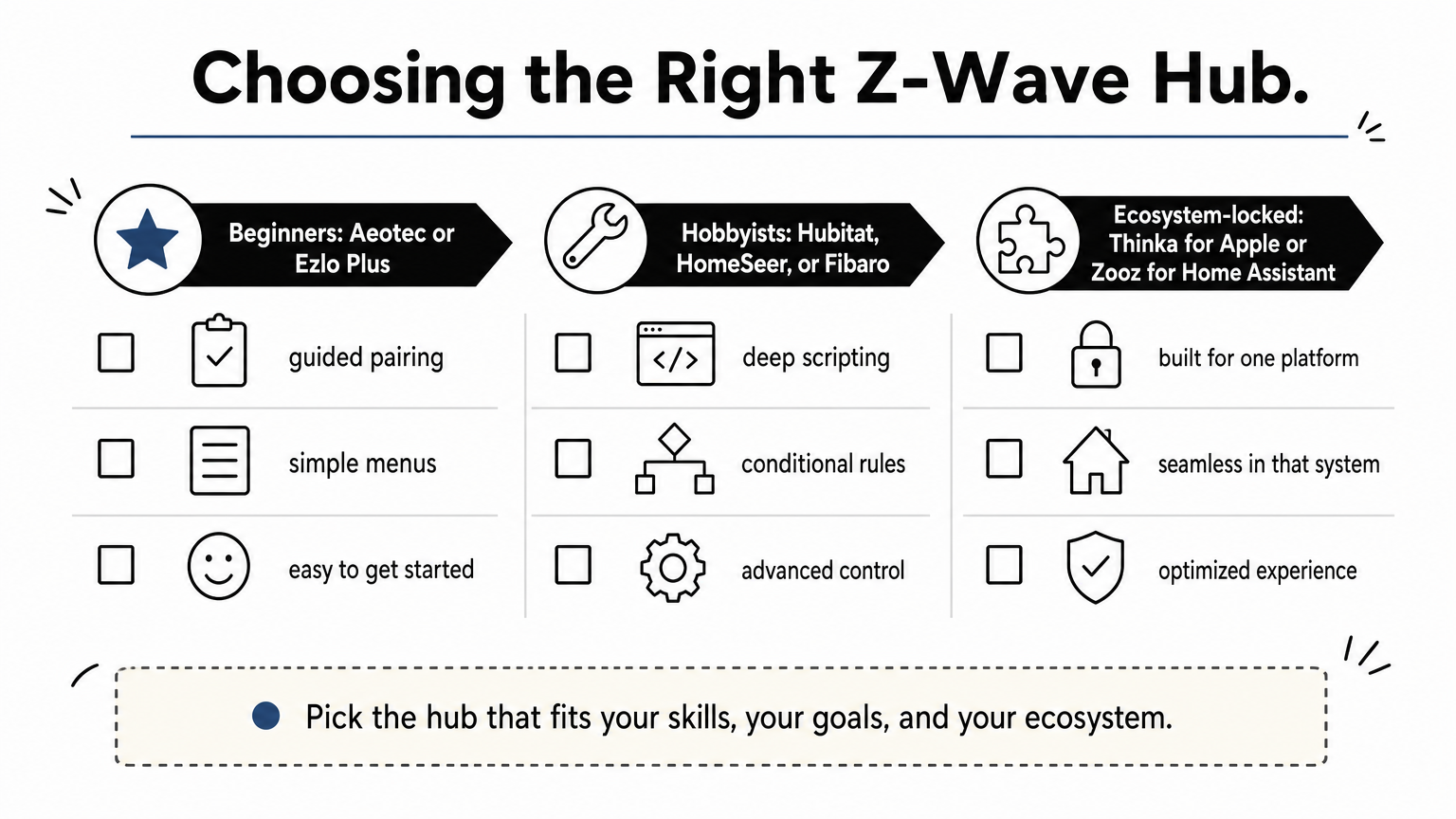
Next, decide how much you want to tinker. Beginners generally do better with Aeotec or Ezlo Plus, where pairing and automations happen through guided menus, much like the pre-matched smart home starter kits we recommend for first builds. Hobbyists who want conditional scripting should look at Hubitat, HomeSeer, or Fibaro, where the depth of the rules engine matters more than how pretty the app looks.
The best z-wave smart home hub is the one that matches how much time you actually want to spend configuring it, not the one with the most features on paper.
Budget narrows the field fast, so weigh it against how many devices you’re actually running:
| Priority | Best fit from this list | Typical price |
|---|---|---|
| Lowest cost, DIY software | Zooz ZST390 | $50-$60 |
| Balanced beginner pick | Ezlo Plus | $70-$90 |
| No-subscription local control | Hubitat Elevation | $130-$150 |
| Apple-only households | Thinka | ~$300 |
| Professional-grade scripting | Fibaro or HomeSeer | $250-$400 |
Finally, check the radio generation. A 700 or 800-series chip handles range and battery life noticeably better than older 500-series hardware, which matters once you’re covering more than a couple thousand square feet.
Bringing your smart home together
A z-wave smart home hub isn’t just another gadget on your shelf, it’s the piece that turns a pile of disconnected locks, sensors, and plugs into a system that actually anticipates what you need. Choosing the right one comes down to honestly answering two questions: how many protocols do you need bridged, and how much time do you want to spend configuring rules? Get those right, and the hub fades into the background while your home just works.
Eight options, eight different tradeoffs. Aeotec and Ezlo Plus keep things simple for beginners, while Hubitat, Fibaro, and HomeSeer reward the tinkerers willing to build custom logic. Thinka locks in Apple households, and the Zooz stick hands full control to anyone running Home Assistant.
Still weighing options against your own device list? Browse our smart home guides and reviews for side-by-side comparisons before you buy.
You Might Also Like
