
Your smart bulbs keep dropping offline. Your motion sensor lags by three seconds. Your keyless entry smart locks for the front door won’t talk to your thermostat. Nine times out of ten, the fix isn’t buying better devices, it’s adding a hub zigbee to your setup so everything speaks the same language instead of fighting over WiFi bandwidth.
A zigbee smart home hub is a small box that acts as a translator and traffic controller for your low-power devices. It connects to your router, then creates its own dedicated wireless mesh network that sensors, plugs, and bulbs join directly. Unlike WiFi gadgets that each hog a slot on your router, Zigbee devices relay signals through each other, so the more you add, the stronger and more reliable your network gets.
Below, we break down exactly how this technology works, what separates Zigbee 3.0 from older versions, and how to tell a zigbee compatible hub worth buying from one that’ll just gather dust. We’ll also point you toward the best zigbee hub picks at different price points, including a solid cheap zigbee hub option if you’re starting small.
Why a Zigbee hub matters for your smart home
Most people don’t think about protocols until their smart home stops working. You buy a few WiFi bulbs, then a WiFi lock, then a WiFi camera, and suddenly your router is straining to manage a dozen always-on connections while your phone still can’t get a strong signal in the garage. A zigbee hub solves this by pulling those low-power devices off your WiFi entirely and putting them on their own dedicated network built for exactly this job.
The range and reliability problem WiFi can’t solve
WiFi was designed to move large amounts of data quickly, think video streams and file downloads, not to manage fifty tiny sensors that each send a few bytes when a door opens. Every WiFi device you add competes for the same limited channels and IP addresses your router hands out, and most consumer routers start choking once you pass 20 to 30 connected devices. Zigbee runs on a completely separate radio band with a protocol built for small, frequent, low-power messages, so it doesn’t add any load to your home network at all. This is the core reason a zigbee smart hub outperforms WiFi-only setups once your device count climbs past a handful.
Add more Zigbee devices and your network gets stronger, add more WiFi devices and it gets slower.
Mesh networking means more devices, not more lag
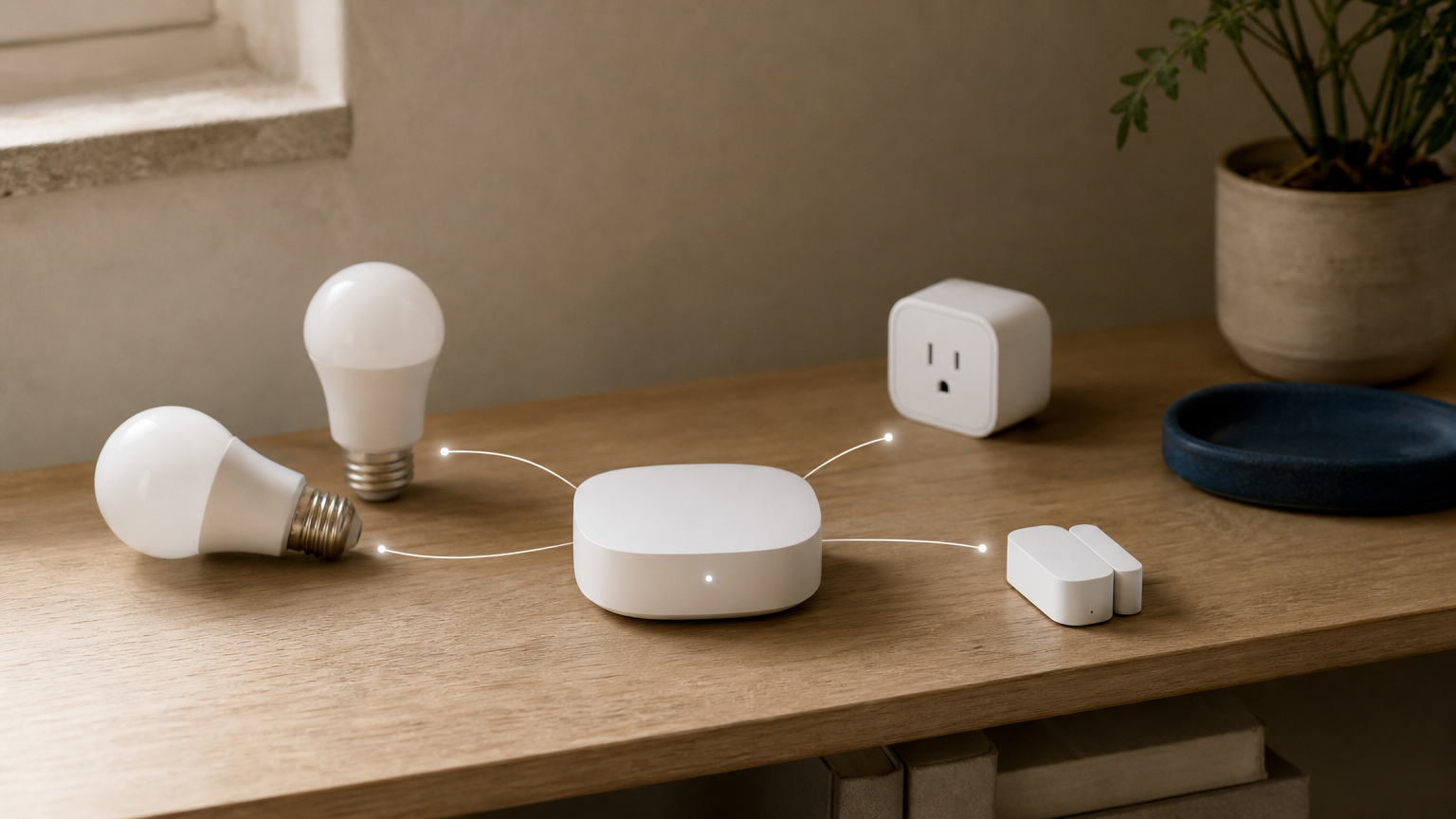
Here’s the part that surprises most first-time buyers: a smart hub zigbee network actually improves as you expand it. Every mains-powered Zigbee device, meaning bulbs, plugs, and outlets, acts as a signal repeater for battery-powered devices like sensors and door locks. So instead of every gadget needing a strong direct line back to the hub, messages hop from device to device until they reach it. A sensor in your basement can relay through a smart plug in the hallway, which relays through a bulb near your router. This is exactly the opposite of how WiFi behaves, where distance and walls degrade the signal with no way to boost it short of adding a mesh router.
Battery life and cost benefits you’ll actually notice
Battery-powered Zigbee sensors sip so little power that most last one to two years on a single coin cell, compared to WiFi sensors that often need charging or battery swaps every few months. That difference matters most for caregivers choosing smart home devices for an elderly parent living alone or homeowners with sensors tucked in hard-to-reach spots like attic doors or crawlspace vents. Lower power draw also means cheaper hardware, since Zigbee radios don’t need the processing overhead WiFi chips require, which is part of why sensors and plugs built for Zigbee networks tend to run several dollars less than WiFi equivalents.
| Factor | WiFi-only setup | Zigbee hub setup |
|---|---|---|
| Router load | Every device connects directly | Zero added load, hub handles it |
| Range | Degrades with distance and walls | Improves as you add devices |
| Battery life (sensors) | 3-6 months typical | 1-2 years typical |
| Practical device limit | 20-30 devices before slowdown | Hundreds of devices |
| Setup complexity | Simple, one app per brand | One app, one hub, more devices |
Ultimately, the decision comes down to how far you plan to grow. If you own three smart plugs and nothing else, WiFi is fine and running a Zigbee smart home without a hub is perfectly reasonable. But once you’re mixing different smart home brands across sensors, locks, and bulbs, or you’re building out a system for a family member who needs dependable welfare-check sensors, a Zigbee hub stops being a nice-to-have and becomes the backbone that keeps everything talking to each other reliably, day after day.
How to set up and connect a Zigbee hub
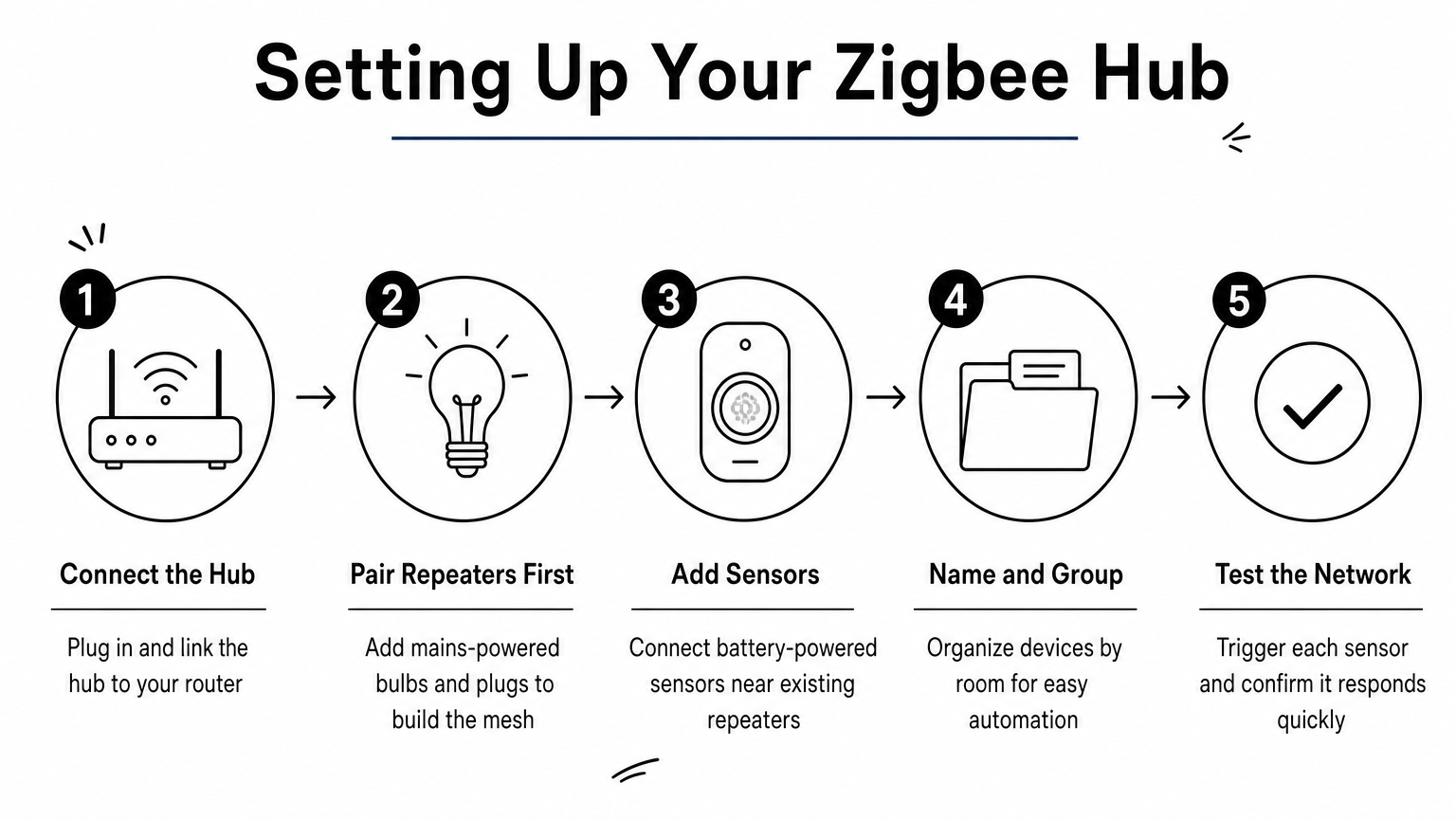
Setting up a hub zigbee system takes less time than configuring a single smart bulb from scratch, mostly because you’re doing the hard part once instead of repeating it for every device. Most modern hubs pair with a companion app, connect to your router over ethernet or WiFi, and then let you add sensors and plugs one at a time through a simple scan-and-name process. Expect the whole setup, hub included, to run 15 to 30 minutes if you’re starting fresh, and our complete smart home setup manual walks through the rest of the system.
Getting the hub itself online
Before anything else, plug your zigbee compatible hub into power and connect it to your router, ideally with an ethernet cable rather than WiFi for a more stable connection. Download the manufacturer’s app, create an account, and follow the pairing prompt, which usually just means holding a button on the hub for a few seconds until it flashes. Once the app confirms the hub is online, you’re ready to start adding devices to the mesh.
A Zigbee hub only needs to be set up once, everything you add afterward joins the network automatically.
Adding your first devices
Here’s the general order that causes the fewest headaches:
- Pair mains-powered devices first (plugs, bulbs, outlets), since these become the repeaters your battery-powered devices will lean on, and pairing a smart plug takes about two minutes.
- Add battery-powered sensors next (door, motion, water leak) once at least a couple of repeaters exist nearby.
- Name and group devices by room in the app so automations and voice commands stay organized later.
- Run a test by triggering each sensor and confirming it shows up in the app within a second or two.
During this stage, most apps auto-detect the device type once it’s in pairing mode, so you rarely need to search a device list manually.
Common setup snags and how to fix them
Occasionally a zigbee smart hub will fail to detect a new sensor on the first try, usually because the device is too far from any repeater or its pairing mode timed out. Restarting the pairing process within a few feet of the hub almost always solves it. If devices keep dropping off after a day or two, check for interference from WiFi routers on channel 11 through 14, since Zigbee and 2.4GHz WiFi share overlapping frequencies. Switching your router to a lower channel, or your hub to a different Zigbee channel in the app’s advanced settings, usually clears it up for good.
Types of Zigbee hubs and how to choose one
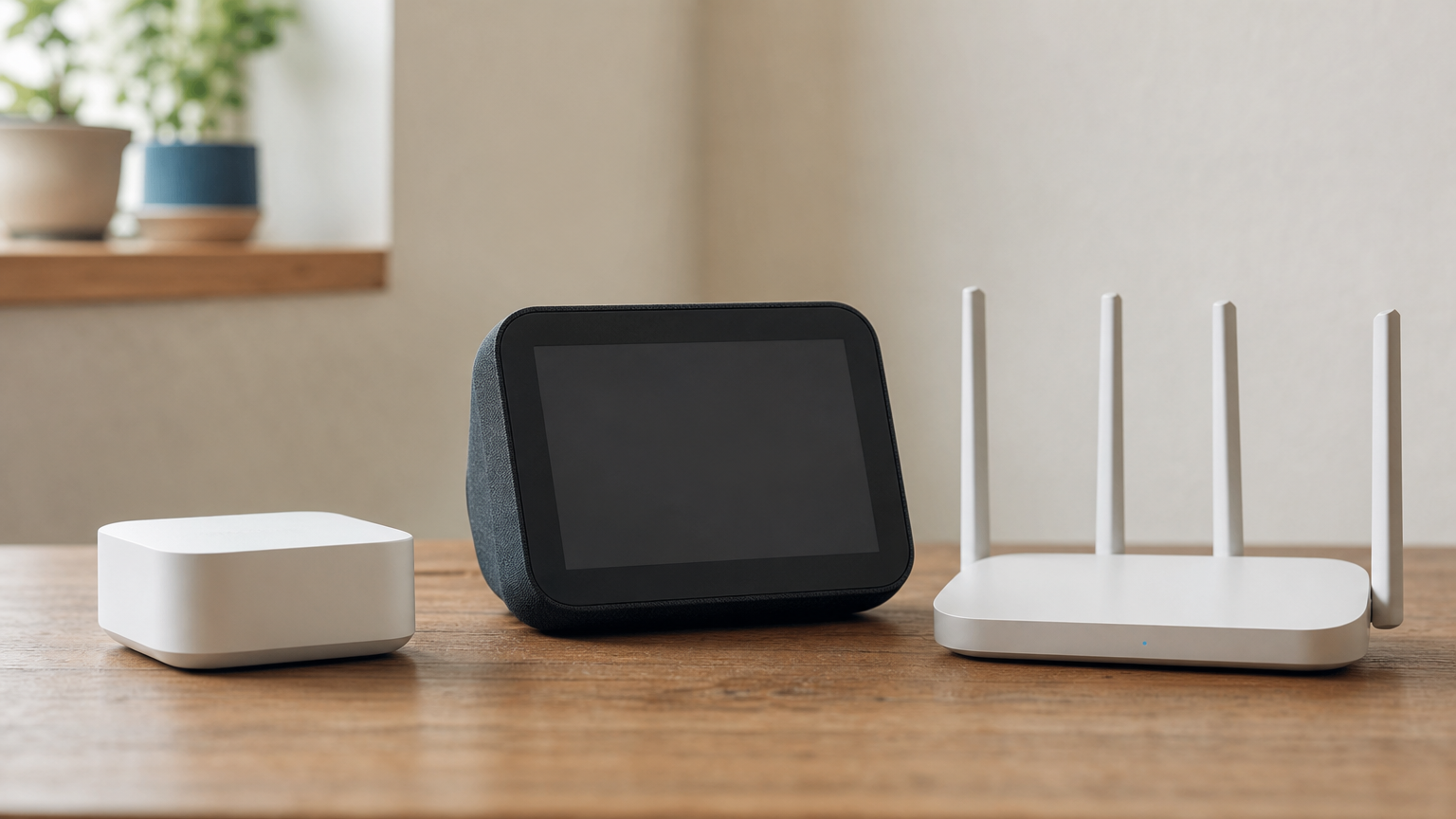
Not every zigbee compatible hub looks or works the same way, and picking the wrong category can leave you stuck mid-project. Broadly, you’re choosing between three setups: a standalone hub built only for Zigbee, a hub tucked inside a smart speaker or display, or a hub built into your WiFi router. Each has real tradeoffs in device capacity, app flexibility, and how much you’ll pay upfront.
Standalone Zigbee hubs
Dedicated hubs, like SmartThings or Hubitat, exist purely to run a Zigbee mesh and often support Z-Wave alongside it. Because the whole box is built around one job, these tend to handle more devices, offer richer automation rules, and get firmware updates focused specifically on radio performance. If you’re planning to eventually run 30, 50, or more sensors and bulbs, a best zigbee 3.0 hub pick from this category gives you the most headroom.
Hubs built into other devices
Some Amazon Echo models and Samsung SmartThings-enabled TVs pack a Zigbee radio directly into hardware you already own, so you skip buying a separate box entirely, and our Echo vs Nest vs HomePod comparison shows which speakers include one. This route is convenient and often the cheapest path in, since you’re not paying for extra hardware. The catch: built-in hubs usually cap out lower, sometimes 30 to 40 devices, and you’re locked into whatever automation features that manufacturer’s app decides to support.
Compatibility with your other devices matters more than any spec sheet, buy the hub that talks to what you already own.
Choosing the right hub for your setup
Before buying, walk through this checklist:
- Check device compatibility against your existing bulbs, locks, and sensors, since not every hub supports every brand equally well (see how the major smart home brands compare).
- Confirm the app ecosystem works with Alexa or Google Home if voice control matters to you, and weigh Alexa vs Apple HomeKit before you commit.
- Look at device limits and add 20 percent headroom for whatever you think you’ll eventually need.
- Compare price against features, since a cheaper hub with fewer automation options can cost you more time later.
| Hub type | Best for | Typical device limit |
|---|---|---|
| Standalone dedicated hub | Larger, growing setups | 100+ |
| Speaker or display built-in | Small, simple homes | 30-40 |
| Router built-in | Renters wanting one box | 20-30 |
Spend a few extra minutes reading device compatibility lists before you buy. Our full comparison of the best zigbee hub models breaks down exactly which devices pair cleanly with each option, so you’re not guessing after the box is already open.
Zigbee 3.0 compatibility and budget considerations
Confusion about Zigbee versions sends more shoppers back to the return page than any other spec. Zigbee 3.0 unified what used to be a mess of separate profiles (Home Automation, Light Link, and others) into one standard that any certified device should speak, regardless of brand. That means a motion sensor built for lighting control and a plug built for home automation can now join the same mesh without a translator app in between. If a listing doesn’t mention Zigbee 3.0 or Zigbee HA certification, treat that as a warning sign rather than an oversight.
What Zigbee 3.0 actually fixed
Before this update, buying two Zigbee devices from different manufacturers was a coin flip. One might pair instantly, the other might sit in your app’s device list forever, stuck on “connecting.” Zigbee 3.0 standardized the commands devices use to talk to a hub, so a zigbee 3 hub certified after 2017 or so should handle almost anything with the Zigbee logo on the box. The Connectivity Standards Alliance, which oversees the certification, publishes a public list of compliant products if you want to double-check a specific device before buying.
If a Zigbee device isn’t certified 3.0, don’t assume it’ll play nice with your hub, check first.
Reading the compatibility label before you buy
Manufacturers don’t always advertise the version number clearly, so look for phrases like “Zigbee 3.0,” “ZHA,” or “works with SmartThings/Hubitat” in the product description rather than just the word “Zigbee” on its own. A genuinely zigbee compatible hub will list supported device categories on its own product page or Amazon listing, and reputable sellers update these lists as new devices get certified.
Budget tiers worth considering
Spending more doesn’t always buy you more reliability, but it usually buys more device capacity and better app support. Here’s roughly what each price tier gets you:
| Price range | What you get | Best for |
|---|---|---|
| Under $40 | Basic standalone hub, 20-30 device limit, limited automations | First-timers testing the waters |
| $40-$80 | Full-featured hub, 50-100+ devices, strong app ecosystem | Most households |
| $80+ | Multi-protocol hub (Zigbee, Z-Wave, Matter), advanced automation engine | Larger homes, tech enthusiasts |
Generally, the cheapest zigbee hub you can find works fine for a starter setup of five to ten devices, alongside other smart home gear under $50, but expect to outgrow it within a year if you keep adding sensors. Our current picks for the best zigbee hub options at each tier are updated monthly on the site, so check there before settling on a budget number.
Zigbee hub vs. Wi-Fi and other smart home protocols
Protocol debates confuse more shoppers than any spec sheet, so let’s cut through it. A zigbee hub isn’t competing with your router, it’s handling a job WiFi was never built for. But Zigbee also isn’t the only low-power option out there, and knowing where it beats Z-Wave, Matter, and Bluetooth helps you avoid buying redundant hardware.
Zigbee vs. WiFi: different jobs entirely
WiFi excels at moving large amounts of data fast, think cameras streaming 1080p video or a smart display pulling app updates. Zigbee excels at the opposite: tiny, frequent messages from sensors and switches that need to fire instantly without hogging bandwidth. Running both side by side isn’t redundancy, it’s division of labor. Your camera stays on WiFi, your door sensors and bulbs move to the zigbee smart home hub, and neither network drags the other down.
Zigbee vs. Z-Wave: similar goals, different radios
Z-Wave operates on a lower frequency than Zigbee, which gives it slightly better wall penetration but a smaller practical device ceiling, usually around 232 devices per network versus Zigbee’s theoretical thousands. Z-Wave also requires certification through a single governing body, which historically made cross-brand compatibility more consistent, though Zigbee 3.0 closed most of that gap. Neither protocol is objectively better; the real question is which one your preferred devices actually use, since a device built for one radio won’t join the other’s mesh no matter how good your hub is.
Buying devices that match your hub’s radio matters more than chasing the “better” protocol on paper.
Zigbee vs. Matter and Thread
Matter is a newer software layer, not a competing radio, and it often rides on Thread, a mesh protocol similar in concept to Zigbee. The practical difference today: Matter device selection is still catching up, while Zigbee has a decade-plus head start and a far deeper product catalog on Amazon right now. Many newer hubs support both, letting you run Zigbee devices you already own alongside Matter devices as that ecosystem matures.
| Protocol | Best at | Device ceiling | Maturity |
|---|---|---|---|
| WiFi | High-bandwidth devices (cameras, displays) | 20-30 practical | Long-established |
| Zigbee | Sensors, plugs, bulbs, mesh scaling | 100s | Long-established |
| Z-Wave | Sensors, locks, wall penetration | ~232 | Long-established |
| Matter/Thread | Cross-brand future-proofing | Growing | Emerging |
Eventually, most smart homes end up running two or three of these protocols at once, and that’s fine. The goal isn’t picking one winner, it’s matching each device category to the radio built for its job.
Making Zigbee work for your home
A zigbee hub earns its keep the moment you stop babysitting dropped connections and start trusting your sensors to just work. You’ve seen why the mesh scales instead of straining, how setup takes half an hour instead of a weekend, and where Zigbee 3.0 certification saves you from returning devices that never should’ve been in the same cart. None of that requires guesswork anymore, just a hub that matches your device count and a shopping list that respects your budget tier.
Start small if you’re unsure: one hub, a handful of plugs, a sensor or two, then expand once you trust the mesh. Every device you add afterward only strengthens what’s already running. If you’re ready to pick an actual model instead of comparing specs forever, browse our best smart home starter kits and match one, hub included, to your setup today.
You Might Also Like
