
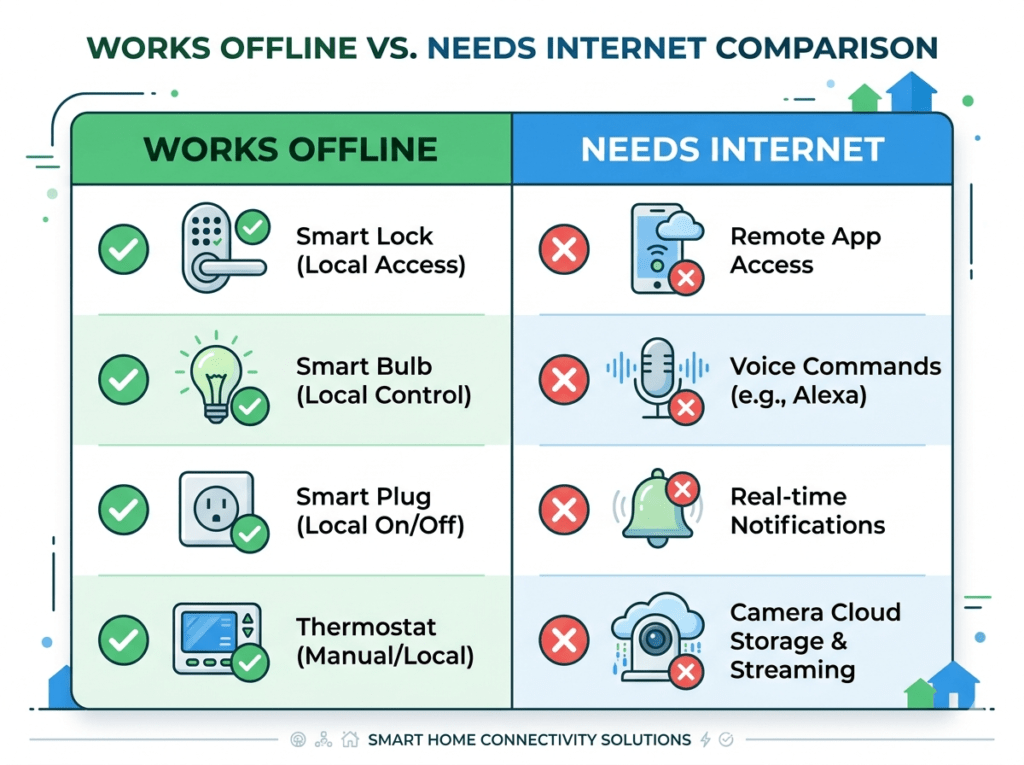
Quick Answer: Most smart home devices continue to function physically when your internet goes down — lights still illuminate, locks still lock and unlock, thermostats still regulate temperature. What stops working is remote control (the app), voice commands through cloud-based assistants, and notifications to your phone. The physical function always remains.
An internet outage is the moment that reveals the difference between a well-designed smart home and an over-dependent one. Some homes go completely dark — lights unresponsive, locks inaccessible, cameras offline, voice assistants silent. Others barely notice the outage — schedules run as programmed, physical controls still work, and local-processing devices respond to commands over the home network.
The difference comes down to one question you should ask before buying any smart device: does this work locally, or does every command go through a cloud server? This guide answers that question for every major device category — and tells you how to build a smart home that keeps working when your broadband fails.
1. The Simple Answer: Two Categories of Smart Devices
Category 1: Cloud-Dependent Devices
These devices require an active internet connection to process commands. When your internet goes down, all smart control stops. The device reverts to its basic physical function only. Most Wi-Fi smart bulbs and camera cloud storage fall into this category — they connect to the manufacturer server for every command, and without that server connection, they cannot respond to app or voice instructions.
Category 2: Locally-Processed Devices
These devices process commands on your home network without needing to reach an external server. When internet goes down, they continue responding to app commands (from your phone on the same Wi-Fi network), maintain their schedules, and operate normally. Zigbee hub-based systems, Z-Wave systems, and Matter-certified devices with Thread connectivity fall into this category.
The Practical Implication: A Wi-Fi smart bulb bought in 2022 probably stops responding when internet goes down. A Matter-certified smart bulb bought in 2026 continues working over your local network. This is the most significant practical advantage of the Matter standard for everyday users.
2. Device-by-Device Breakdown: What Works Offline
| Device Type | Physical Works? | App Works? | Voice Works? |
| Smart bulbs (standard Wi-Fi) | Yes — switch works | No | No — Alexa/Google need internet |
| Smart bulbs (Matter/local) | Yes | Yes (local) | No — voice assistants need internet |
| Smart thermostat | Yes — manual works | No | No |
| Smart lock (code/fingerprint) | Yes — codes work | No | No |
| Smart lock (Bluetooth) | Yes | Yes (BT) | No |
| Smart plugs | Yes — manual button | No | No |
| Smart speaker (Echo/Google) | Limited — alarms | N/A | Partially (local music) |
| Security cameras (cloud) | Records locally | No live view | No |
| Security cameras (local storage) | Records to SD card | No remote | No |
| Zigbee hub system (Hue etc.) | Yes | Yes (local) | No |
| Matter devices (Thread) | Yes | Yes (local) | No |
| Smart doorbell | Physical button works | No live view | No |
3. What Stops Working When Internet Goes Down
Voice Assistant Commands
Amazon Alexa, Google Assistant, and Apple Siri all process voice commands through cloud servers. When your internet goes down, these assistants cannot process requests — even if your Echo or Nest Hub has power, saying “Alexa, turn on the lights” produces no response because Alexa cannot reach the Amazon server to interpret the command and send instructions.
Exception: Amazon Echo devices retain a small set of locally-processed commands for alarms, timers, and some music playback even without internet.
App Control From Outside Your Home
Any command you send from your phone while away from home requires internet on both ends — your phone and your home router. During an outage, remote app control of every device stops completely. You can still check your phone app, but commands will not reach the devices.
Smart Camera Live View and Cloud Recordings
Camera live view from outside your home requires internet connectivity. Cloud storage of recordings stops during an outage — cameras with local MicroSD storage continue recording to the card, but cameras that rely entirely on cloud storage stop recording. This is a significant argument for choosing cameras with local storage options.
Reolink Argus 4 Pro — local SD storage, no cloud dependency — ~$90-110
Eufy SoloCam S340 — 8GB built-in storage, works without internet — ~$130-150
Notifications and Alerts
Every push notification your smart home sends to your phone — motion detected, door opened, lock status change — travels through internet servers. During an outage, all notifications stop. Local sirens and audible alerts (on devices that have them) continue working, but phone alerts do not.
Automation Syncing
Cloud-stored automations that rely on external data — weather-based triggers, location-based geofencing, and time-zone dependent schedules — may not execute correctly during outages. Automations stored locally on the hub or device continue running.
4. Which Smart Home Systems Work Best Offline?
Best: Zigbee Hub-Based Systems (Philips Hue, IKEA Tradfri)
Zigbee systems process commands locally on the hub device. When internet goes down, the Hue Bridge or IKEA Dirigera continues routing commands from the Hue or Home app on your phone (when on the same Wi-Fi network) to the bulbs. Schedules continue running. Automations triggered by local events continue firing. Only cloud-dependent features — remote access from outside your network and voice assistants — stop working.
Philips Hue Starter Kit — hub-based, excellent offline capability — ~$70-100
Best: Matter with Thread Border Router
Matter-certified devices using the Thread protocol represent the most resilient smart home architecture in 2026. Thread creates a local mesh network that operates completely independently of your broadband connection. A Google Nest Hub or Apple HomePod mini acting as a Thread Border Router allows all Thread devices on the network to communicate with each other and respond to local app commands even with no internet.
Good: Bluetooth Smart Locks
Smart locks with Bluetooth capability — August, Level Bolt — can be controlled from the Bluetooth connection between your phone and the lock when you are within range. No internet required for local physical access. Remote access (unlocking from away) requires internet, but local control works offline.
August Wi-Fi Smart Lock — Bluetooth local + Wi-Fi remote — ~$180-220
Limited: Standard Wi-Fi Smart Devices
Most standard Wi-Fi smart bulbs, plugs, and devices from Kasa, Wyze, and Govee process commands through cloud servers. During internet outages, smart control stops and only physical controls (wall switch, manual button) work. Schedules programmed before the outage may or may not run depending on whether the schedule is stored on the device or in the cloud.
5. How to Make Your Smart Home More Resilient
Step 1: Choose Matter-Certified Devices Going Forward
When buying new smart home devices, choose Matter-certified options. Matter devices process commands locally, work across all major voice assistants, and maintain functionality during internet outages. The selection of Matter-certified products has expanded significantly in 2025-2026 to cover every major device category.
Step 2: Add a Thread Border Router
A Thread Border Router allows Matter devices to communicate with each other locally without any cloud server involvement. Google Nest Hub (2nd Gen), Apple HomePod mini, and Amazon Echo (4th Gen) all function as Thread Border Routers. Adding one of these to your home immediately improves the offline resilience of all Matter devices on your network.
Google Nest Hub 2nd Gen — Thread Border Router + smart display — ~$90-100
Step 3: Use Cameras With Local Storage
Replace any cloud-only cameras with models that support local MicroSD storage. Reolink and Eufy cameras store footage locally at full quality with no subscription and no cloud dependency. During internet outages, these cameras continue recording — you just cannot view footage remotely until connectivity is restored.
Step 4: Set Schedules on Devices, Not Apps
Many smart devices allow schedules to be stored directly on the device hardware rather than in the cloud. Kasa smart plugs and bulbs store schedules on-device — they continue running programmed schedules even without internet. Check the manufacturer app for a “local schedule” or “on-device storage” option and configure schedules this way where available.
6. The Matter Advantage: Local Processing Explained
Matter is the smart home industry standard launched in 2022 and rapidly expanding in 2026. Its most significant practical advantage for everyday users is local processing — commands travel directly between your controller device (phone or hub) and the smart device over your home network, without going through any external server.
A practical example: you are at home and say “turn off the living room lights.” With a standard Wi-Fi smart bulb, the command travels from Alexa on your Echo to Amazon servers in the cloud, which then sends a command back to your router, which sends it to the bulb. Four network hops through the internet. With a Matter/Thread bulb and a local hub, the command travels from your hub to the bulb directly over Thread. One local network hop. No internet required.
The result: Matter devices are faster, more reliable, and continue working during internet outages. They also work with Alexa, Google Home, and Apple HomeKit simultaneously — one device, every ecosystem.
7. What Happens to Security When Internet Goes Down?
This is the concern most people have but few guides address directly. Here is the honest picture:
- Smart locks with code/fingerprint entry continue working — codes are stored on the device hardware and function without internet
- Smart cameras with local storage continue recording — you cannot see live view remotely but footage is captured locally
- Smart alarms with local siren capability continue alerting audibly within the home
- Remote alerts (phone notifications) stop — you will not receive push notifications during an outage
- Cloud-only cameras stop recording — this is the most significant security gap during outages
- Smart doorbells still ring physically but you cannot see who is at the door remotely
The practical conclusion: a smart home with local storage cameras, code-entry smart locks, and local-alarm capability maintains meaningful security during internet outages. A smart home entirely dependent on cloud services loses most of its security functionality.
Critical Recommendation: If home security is your primary smart home motivation, prioritise devices with local functionality: cameras with MicroSD storage, smart locks with code entry (not app-only), and any alarm system with a cellular backup connection (SimpliSafe has this). These continue functioning independently of your broadband.
8. How to Keep Your Router Online During Power Cuts
Internet outages caused by broadband provider issues are beyond your control. Power cuts that knock out your router are something you can address:
- Connect your router and modem to a UPS (Uninterruptible Power Supply) — a battery backup device that keeps electronics running during brief power cuts. A basic UPS costs $40-80 and keeps a router running for 2-4 hours during a power outage.
- Some mesh Wi-Fi systems (Amazon Eero) have optional battery modules that provide several hours of wireless coverage during power cuts.
- Mobile hotspot from your phone provides internet backup for your most critical smart devices during extended outages — most modern phones can share their mobile data connection as a Wi-Fi hotspot.
APC Back-UPS 600VA UPS Battery Backup — ~$60-80
9. Frequently Asked Questions
Will smart lights work when Wi-Fi is down?
The physical wall switch continues to work regardless of Wi-Fi status — flipping the switch turns the bulb on and off normally. What stops working is app control, voice control, and automated schedules (for cloud-stored schedules). Matter-certified smart bulbs with a Thread Border Router continue responding to local app commands on your home network even without internet.
Can Alexa do anything without internet?
Very limited functionality. Echo devices retain local processing for a small set of commands: setting and cancelling alarms and timers, some music playback from locally cached content, and basic device control on the same local network if Matter and Thread are configured. Smart home control, information queries, and most Alexa features require internet.
Do smart thermostats work without internet?
Yes — always. Smart thermostats retain full manual operation when internet is unavailable. You can adjust temperature via the physical touchscreen on the device. Pre-programmed schedules stored on the device hardware continue running. What stops working is app control from your phone, geofencing, and weather-based adjustments that rely on external data.
Will my smart lock still work without internet?
Any smart lock with code or fingerprint entry continues working without internet — entry codes are stored on the device hardware, not in the cloud. Bluetooth-enabled locks can be controlled via the manufacturer app when your phone is physically near the lock, even without internet. What stops: remote unlocking from away, activity log syncing to the cloud, and voice assistant control.
Do scheduled automations run during internet outages?
Depends on where the schedule is stored. Schedules stored on the device hardware (Kasa plugs store schedules locally, most Zigbee hub systems store schedules on the hub) continue running. Cloud-stored schedules and automations (those that require an active connection to execute) may not run. Check your manufacturer app for local schedule storage options and use them for critical automations.
How long do internet outages typically last?
In the UK and US, the majority of residential broadband outages resolve within 1-4 hours. Outages lasting more than 24 hours are rare and typically caused by local infrastructure damage from severe weather. For most households, planning for 4-hour resilience (UPS for router, local storage cameras, code-entry locks) covers the vast majority of real-world scenarios.
Is there a smart home system that works entirely without internet?
Home Assistant — an open-source smart home platform installed on a local server device like a Raspberry Pi — can operate an entire smart home entirely locally without any internet dependency. Voice control requires a local speech recognition model (available but complex to configure). This approach is the gold standard for offline resilience but requires significant technical knowledge to set up and maintain. For most households, a Matter-based setup with a Thread Border Router provides 80% of the resilience with 20% of the complexity.
10. The Resilience Checklist
Use this to audit your current smart home setup:
- Smart locks: do they have code or fingerprint entry that works without internet? If app-only — upgrade
- Security cameras: do they have MicroSD local storage? If cloud-only — add local storage cameras
- Smart thermostat: can it be adjusted manually on the device? All major brands — yes
- Smart bulbs: are any Matter-certified with local processing? If not — plan to upgrade over time
- Router backup: is your router on a UPS? If not — add one for $60-80
- Critical schedules: are they stored on the device, not only in the cloud? Check and reconfigure
- Mobile hotspot: can your phone serve as backup internet for critical devices? Test this now
The key insight: a smart home that fails completely when the internet goes down is not a resilient smart home — it is a convenient-weather smart home. The best smart home setups are designed to degrade gracefully: full functionality with internet, meaningful functionality without it.
You Might Also Like

Marcus spent 8 years as a residential technology consultant before founding Smart Home Advisor Hub in 2024. He has personally tested over 200 smart home devices.
All articles by Marcus →